

Corporate Event Recording Services
Event recording for Conferences, Town Halls and Training Sessions
Preserve your corporate event with high-quality multi-camera recording services designed for training, marketing, and future content distribution.
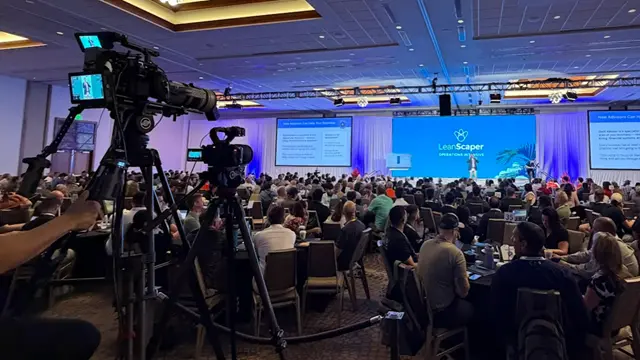
Every session is captured on its own, with sharp slides, clean audio and a backup copy. You choose raw files or finished edits.
If a speaker's laptop glitches or a lavalier battery dies, you can't re-run the session. The recording has to survive those moments, because the people who need it will watch it later.
Eleven Eleven Audio Visual provides conference recording and corporate event recording across the US, from a single-room town hall to a multi-track summit. We record the sessions. If you need a full production with live switching and a streaming program, that's our full event video production service.
Our Performance at Scale
11+
Years in Business
Producing corporate events nationwide since 2015
500+
Enterprise Clients
From executive town halls to multi-location conferences.
400+
Events Executed
Generating 85% audience engagement on average.
18+
U.S. States Served
Coast-to-coast event production and deployment.
99%
Technically Sound
Redundant Audio Visual systems, & bonded internet.
What You Get, Specifically
|
Item |
How we handle it |
|
Cameras |
[2-4] for most single-room events: speaker close-up, wide stage, audience or lectern. |
|
Audio |
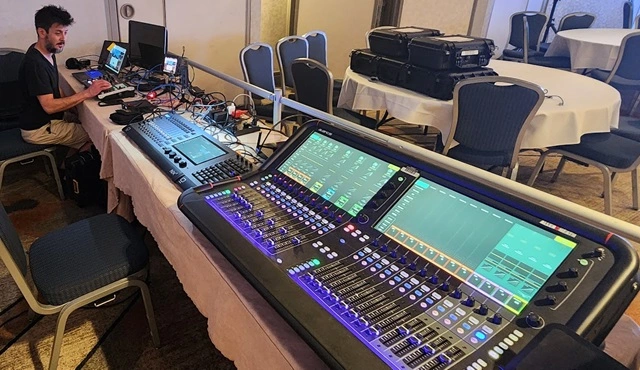
A direct feed from the house soundboard, plus our own lavalier or handheld mic as a backup track |
|
Slides |
Captured straight from the presenter's signal, not filmed off a screen (explained below) |
|
Backup |
A second recorder runs on every keynote and critical session. |
|
File formats |
e.g., H.264 MP4 for review and web, ProRes or similar for archive |
|
File naming |
e.g., Event_Room_SessionTitle_Speaker_Date] so noboy hunts through a hard drive |
|
Transfer |
Media copied to drives before the room is cleared. Delivered by [secure link/drive]. |
TIP
Ask any vendor for their file naming convention. Vendors who have one have usually dealt with big, messy archives before.
Presentation Recording: How We Keep Slides Readable
A camera aimed at a projector screen gives you a washed-out, off-angle slide that nobody can read. We do it differently:
- Tap the signal. We take a clean feed from the presenter's laptop or the venue's switcher.
- Record it separately. Slides are saved as their own file, alongside the speaker camera.
- Combine them in the edit. The finished video uses a side-by-side or picture-in-picture layout, switching emphasis when the slide matters most.
If the room has several speakers on different laptops, we plan the signal path in advance. That's also where mismatched display settings tend to cause black screens, which we explain in our EDID compliance guide for corporate AV.
Audio: Soundboard Feed, Backup Mics and Room Noise
Audio is where most bad recordings fail. We use three layers:
- Soundboard feed. We patch into the house mixer for a clean mix of the speaker's mic. If the venue lacks a usable system, we can bring sound system rental so both the room and the recording sound right.
- Our own backup mics. A lavalier or handheld is recorded separately, so a dead house mic doesn't leave you with silence.
- Room mic for Q&A. Audience questions often aren't on the house mix, so we capture them separately.
Raw Footage or Edited Videos? Pick What Fits
|
Raw delivery |
Edited delivery |
|
|
What you receive |
Camera files, slide capture, audio tracks |
Finished session video with branding |
|
Best for |
Archives, legal records, teams with in-house editors |
Intranet, LMS, customer-facing replays |
|
Includes |
Organized, labeled files |
Cuts, slide layout, lower-thirds, intro/outro, [2] revision rounds |
|
Typical timing |
Same day |
Within 2 days |
|
Cost |
Lower |
Higher, depending on the number of sessions |
Many clients choose both: raw files for the archive, and edits only for the sessions that matter.
Where Conference Recording Fits (and Where It Doesn't)
We record conferences, keynotes, town halls, training and workshop sessions, and investor or leadership briefings. Sales kickoffs, launches and streamed events are handled by our production side. See our sales kickoff production and hybrid event production pages if you need live switching and a streamed program, not just a recording.
Camera Setups by Event Size
|
Event |
Typical setup |
|
Workshop or meeting (under 50 people) |
2 cameras, audio feed, slide capture |
|
Single-room conference or town hall |
3-4 cameras, slide capture, backup recorder |
|
Multi-track summit |
Main stage with 3-4 cameras, breakout rooms with 1-2 each, recorded as separate programs |
Cameras are only half of it. In dark ballrooms, our event lighting team can brighten speakers' faces without affecting the room's atmosphere.
How Our Event Recording Process Works
From initial planning to final file delivery, our structured recording process keeps your conference sessions organized, professionally captured, and ready for future use.
We coordinate with your team and venue to minimize technical surprises and ensure every recording meets your agreed requirements.
01
Planning & Agenda Review
We review your event schedule, session rooms, speakers, and recording requirements to plan coverage around your conference priorities.
02
2. Technical Coordination
We confirm camera positions, audio feeds, power access, and presentation signal paths with your venue and AV team before recording begins.
03
3. Pre-Event Setup & Testing
Our crew sets up and tests recording equipment, audio feeds, and slide capture before attendees arrive, helping minimize technical surprises.
04
4. Professional On-Site Recording
A dedicated crew lead coordinates recording throughout your event, giving your team a clear point of contact for on-site production needs.
05
5. Media Backup & File Management
We copy recorded media to multiple storage drives after each session to reduce the risk of losing important conference content.
06
6. Organized Delivery
Receive raw recordings, edited session videos, or both, delivered in your agreed formats for internal training, on-demand viewing, and future content use.
Planning event timeline first?
Use our corporate event planning checklist to map out key milestones, organize event details, and prepare for a more productive discovery call.
Proof From Real Events
The Challenge: Protect executive IP from noise.
The Solution: Real-time digital signal mastering.
The Result: Flawless, studio-quality master recordings.
The Impact: Instant, global podcast-ready training library.
What Affects the Price of Conference Recording
|
Factor |
Effect |
|
Cameras and rooms |
Biggest driver |
|
Event length |
Half-day vs. multi-day |
|
Raw vs. edited |
Editing time scales with the number of sessions |
|
Turnaround |
Standard vs. rush |
|
Travel |
Crew size and location. Our event logistics services can handle freight and load-in for large programs. |
COST TIP
Tell us which sessions need three cameras and which can run on two. Recording the keynote in multi-camera and breakouts in a simpler setup is a common way to control budget.
Before the Event: Four Things That Improve the Recording
- Send slide decks early so we can plan for video clips and animations.
- Tell us who needs the footage. Legal archives, LMS uploads and social clips need different files.
- Share the room layout and lighting. Colored uplighting and dark ballrooms are the usual troublemakers.
- Name one on-site decision-maker. It prevents conflicting last-minute changes.
If you're still organizing the event itself, our corporate event management team can handle that, too.
Frequently Asked Questions About Event Recording
Get a Recording Plan for Your Event
Send us your date, city, number of rooms and who needs the files afterward. You'll receive a camera and audio plan, a fixed price, and a delivery date within one business day.