
Event Run of Show Template: Free Excel Download
09/17/2026
Corporate Event Planning Checklist — Free Download
09/18/2026
Here's the pattern we see on almost every hybrid event that goes sideways: the in-room experience gets 90% of the planning attention, and the remote audience gets whatever's left over. The stage looks great.
The lighting is dialed in. Then the stream buffers during the keynote, remote attendees can't hear the Q&A, and forty people who couldn't travel just watched your company's biggest event of the year fall apart from their laptop.
Hybrid isn't two easier events happening at once. It's one event with two audiences who both need to walk away feeling like they were actually there — and that requires planning venue logistics and stream production as a single connected system, not two separate checklists taped together.
That's the gap this one closes.
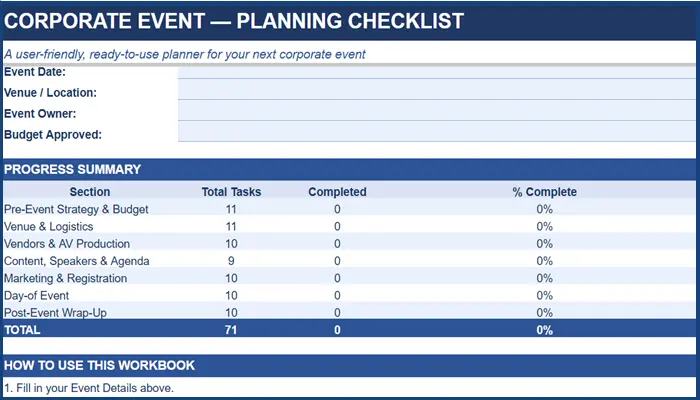
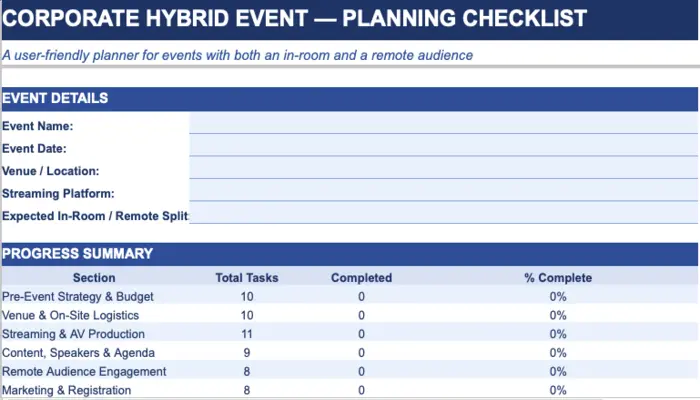
76 tasks across 8 planning phases, including two built specifically for the remote side most templates skip.
Also explore related Checklists, and templates
Why a Generic Event Checklist Doesn't Cover Hybrid
Take a standard corporate event checklist and it'll get you through venue booking, catering, and an agenda. What it won't tell you:
- Whether your venue's internet bandwidth can actually support a live stream at your expected viewer count
- Who's responsible for relaying a remote attendee's question to a speaker standing on stage
- What your backup plan is when — not if — the primary stream connection drops mid-session
- Whether remote attendees are getting the same materials, the same networking access, and the same sense of participation as the people in the room
This checklist has two phases most templates leave out entirely: Streaming & AV Production and Remote Audience Engagement. Everything else follows the same structure you'd expect from a solid event plan — it's those two sections that make it hybrid-specific instead of generic.
What's Inside this Corporate Hybrid Event Checklist
|
Phase |
What It Covers |
The Failure Point It Prevents |
|
Pre-Event Strategy & Budget |
KPIs for both audiences, in-room/remote ratio, split budget lines |
Streaming gets treated as an add-on line item instead of core production cost |
|
Venue & On-Site Logistics |
Bandwidth confirmation, camera sightlines, control booth placement |
Venue gets booked for capacity and catering before anyone checks internet capacity |
|
Streaming & AV Production |
Redundant connections, camera plan, dedicated stream director, backup stream |
One person is trying to run the in-room show and the stream simultaneously |
|
Content, Speakers & Agenda |
Rehearsals that include a live camera test, dual-format materials |
Speakers rehearse to the room but never rehearse to the lens |
|
Remote Audience Engagement |
Chat moderation, question relay, parity of materials and networking access |
Remote attendees get a passive video feed instead of an actual seat at the table |
|
Marketing & Registration |
Separate ticket types, platform login instructions for remote guests |
Remote registrants get the same generic reminder email as in-room guests, minus the access link |
|
Day-of Event |
Combined briefing for both crews, real-time stream health monitoring |
Nobody is watching stream health once the in-room show is underway |
|
Post-Event Wrap-Up |
Segmented analytics and feedback by attendee type |
The debrief only discusses how the room felt, not how the stream performed |
Pro Tip: Assign your stream director and your in-room producer as two separate people with two separate radios, not one person switching hats. The moment a hybrid event usually breaks is the exact moment the in-room producer gets pulled into a stage problem and stops watching the stream.
Who This Checklist Is For
- Event and marketing teams running a hybrid conference, town hall, or product launch
- Internal comms teams broadcasting a leadership event to a distributed workforce
- Sales enablement teams running a hybrid kickoff with reps joining both in-room and remote
- Anyone who's run a hybrid event before and knows exactly why the remote phase exists
How to Work Through It
1. Decide your in-room/remote split before you book a venue
That ratio determines bandwidth needs, camera plan, and budget allocation — get it locked early.
2. Rehearse to the camera, not just the room
A run-through that only checks how a speaker sounds in-person misses how they'll actually appear on the remote feed.
3. An in-house AV requirement discovered too late
A venue's exclusivity clause forces a vendor swap or cost increase after contracts are already signed.
4. Name a stream director separately from your on-site producer
This single task prevents more hybrid failures than almost anything else on this list.
5. Review the Dashboard by phase weekly
paying particular attention to whether Remote Audience Engagement is keeping pace with Venue & Logistics — it's usually the one that falls behind first.
Where Planning Ends and Production Begins
A checklist gets your team aligned on what needs to happen. It doesn't run redundant streaming infrastructure, it doesn't have a stream director standing by when a connection drops, and it can't rehearse your speakers on camera the week of the event.
Hybrid production is genuinely more technically demanding than either a fully in-person or fully virtual event. If you're running two live productions that have to stay perfectly in sync and that's exactly the kind of event where the gap between "planned" and "produced" shows up fastest.
This happens to be the type of event we run most often. If you're weighing whether to handle streaming in-house or bring in a dedicated production team, that conversation is worth having before your venue contract is signed, not after your camera plan falls apart in rehearsal.
Frequently Asked Questions
Running a Hybrid Event Where Neither Audience Can Feel Like an Afterthought?
A checklist keeps your planning organized. What keeps two live audiences in sync on the actual day is production experience — redundant systems, a dedicated stream team, and someone who's done this enough times to know where it usually breaks.
Walk through your venue, streaming platform, and audience split with a producer who runs hybrid events for a living — not a sales rep.