
Corporate Event Email Invitation Template: Free Download
09/11/2026
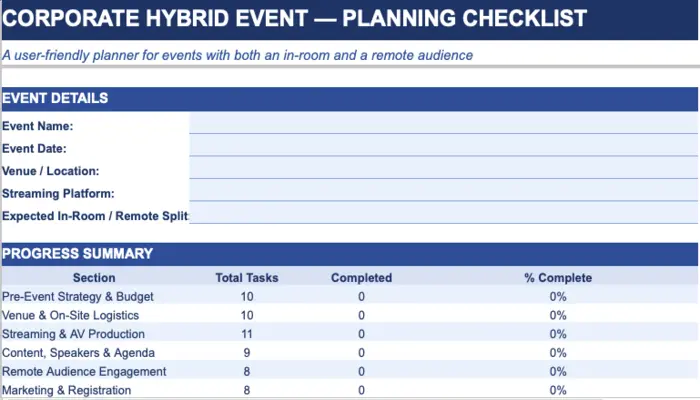
The Corporate Hybrid Event Checklist | Free Download | Editable
09/17/2026
There's a difference between an agenda and a run of show, and most teams don't find that out until they're standing backstage with a speaker asking "am I on now?" and nobody has a clear answer.
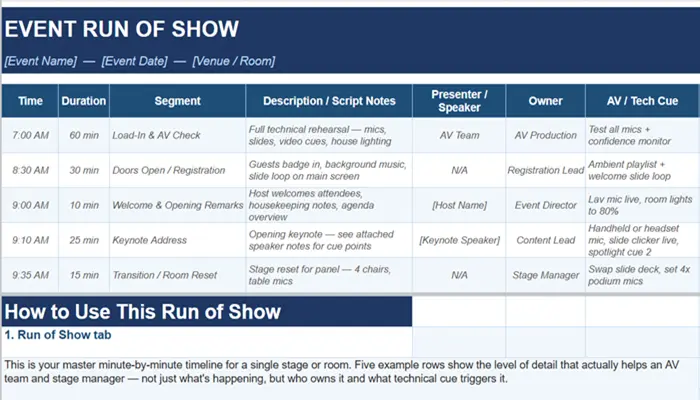
An agenda tells attendees what's happening. A run of shows tells your team what to do — which mic goes live at 9:12, who cues the video at 9:35, what happens if the keynote runs four minutes long.
It's the difference between a document guests read and a document that actually runs the event. Skip that distinction and you end up with dead air, a stage manager guessing at timing, and an AV operator who finds out about a video cue the same moment the audience does.
This template is built the way a production team actually uses one — not as a schedule, but as a cue sheet.
What Makes This a Production Document, Not Just a Timeline
Search "run of show template" and most results are a renamed agenda — time slots and session titles, nothing more. That's fine for attendees. It's not enough for the people making the event happen in real time.
01
An AV/Tech Cue column, built in from the start Every segment gets its own cue — mic type, slide trigger, lighting change — instead of leaving your operator to guess from a session title
02
A Multi-Room Master Schedule for parallel tracks If your event runs breakouts alongside a main stage, this tab lines every room up side by side so a conflict shows up on the sheet, not live on the day
03
A Key Contacts tab built to be printed Names, roles, phone numbers, and radio channels — because during a live show, nobody's reopening a laptop to find a number
04
Status tracking that shades as you update it Not Started, Confirmed, In Progress, Complete, Needs Attention — color-coded automatically, so a stage manager can scan the sheet mid-event and see what's behind at a glance
What is included in the Event Run of Show Template?
|
Tab |
What It Covers |
Why Teams Miss It |
|
Run of Show |
Minute-by-minute timeline with time, duration, segment, presenter, owner, AV cue, mic type, and status |
Most templates stop at "time and session name" — the cue detail that actually prevents dead air gets left out entirely |
|
Multi-Room Master Schedule |
Side-by-side view of every room or track running at the same time |
Room conflicts get discovered during load-in instead of during planning, when there's still time to fix them |
|
Key Contacts & Roles |
Names, roles, phone numbers, radio channels for every on-site lead |
This information lives in someone's phone contacts instead of one shared sheet the whole team can reference |
|
Instructions |
How to fill in each tab and what level of cue detail actually helps |
Templates get handed off with no guidance, so the next person fills it in at agenda-level detail instead of cue-level |
Pro Tip:Write your AV cues as trigger points, not just actions — "Slide 12 advances when the speaker says 'next, let's talk about...'" tells an operator exactly when to act. A cue that just says "advance slides" leaves timing up to a guess, and guesses are where dead air comes from.
A Cue Written Two Ways
Here's the difference between a run-of-show line that reads fine and one that actually works live:
Weak: 9:10 AM — Keynote begins
Production-ready: 9:10 AM (25 min) — Keynote Address. Headset mic live at 9:09 for sound check. Slide deck cued to Title slide. Spotlight cue 2 on speaker walk-on. Confidence monitor active.
The second version is what your AV operator and stage manager are actually working from. The first one is what gets handed to a new hire on a Tuesday and causes a scramble on Thursday.
Who Reaches for This Event Run of Show
Event and stage managers coordinating speakers, AV, and room transitions in real time
AV production teams who need a cue sheet, not just a client-facing agenda
Conference organizers running breakout tracks that overlap with a main stage
Corporate event planners handing off show-day logistics to an internal team or outside AV partner for the first time
Also Explore our other templates
A Run of Show Tells Everyone What Happens Next. It Doesn't Call the Cue When Something Goes Wrong.
The best run of show in the world still assumes everything goes according to plan. It doesn't account for a lav mic cutting out mid-sentence, a video file that won't play, or a keynote running eight minutes long and pushing every cue behind it.
That's the actual job of a show caller — someone live on headset with the AV team, adjusting cues in real time as the event drifts from the plan on paper. A document can tell you what's supposed to happen at 9:35. It can't tell an operator to switch to a backup mic thirty seconds before the next segment starts.
If your event has more than one presenter, any live video or streaming component, or a timeline tight enough that a four-minute delay would cascade through the rest of the day, that's usually the point where a written run of show needs a person calling it live, not just following it.
Event Run of Show Template: FAQs
The Document Gets Everyone Aligned. A Live Show Caller Keeps It Running When Reality Doesn't Match the Plan.
A sharp run of show means your team walks in knowing exactly what happens and when. Whether it holds up when a speaker runs long, a mic drops, or a video won't launch — that's what happens in the room, not on the page.
Bring us your draft timeline and we'll tell you, honestly, where it needs a live show caller and where it doesn't.