
How to Plan a Trade Show
11/13/202612 Trade Show Booth Design Ideas That Pull Visitors In (2026)
11/19/2026
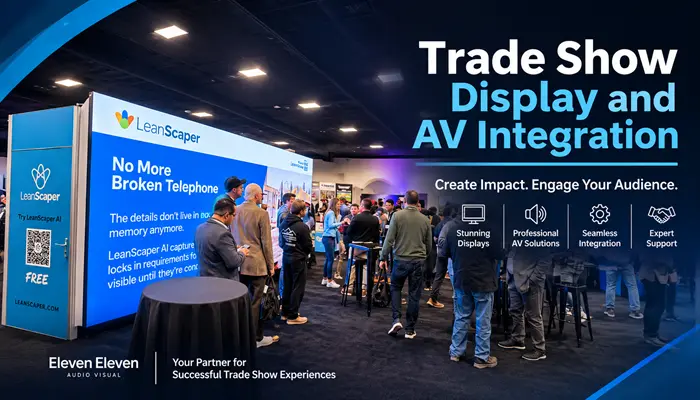
Trade show display and AV integration comes down to five decisions: how far away your visitors will stand, how your booth is laid out, what content you will play, how bright the hall is, and what the venue allows. Settle those while the booth is still being designed, not after the crates are packed.
This guide from Eleven Eleven Audio Visual is for exhibitors and marketing teams choosing booth technology, and for event managers who want enough detail to judge a vendor's answers. It covers display types, pixel pitch, lighting, sound, content and power, and ends with a checklist you can hand to your AV team. Download the AV spec checklist and keep it open as you read.
What Trade Show Display and AV Integration Means in a Booth
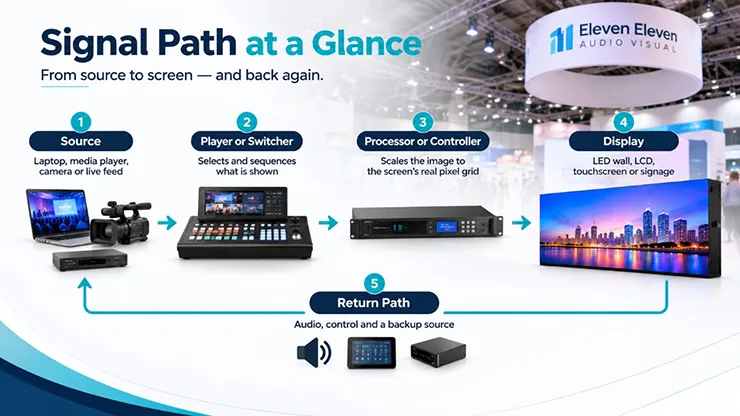
A booth screen is never just a screen. It is one link in a chain: a source (a laptop, media player or camera) feeds a player, the player feeds a processor or controller, and the processor drives the display. Lighting changes how that display looks. Speakers decide whether visitors stay or walk on. Control, whether that is a tablet, a button or a technician with a remote, ties it all together.
When these pieces are chosen by different people at different times, you get the classic floor-day surprises: a wall that washes out under spotlights, a video that stretches because nobody checked the aspect ratio, a speaker that drowns out the booth next door. Integration simply means treating the whole chain as one design problem.
Signal path at a glance:
- Source: laptop, media player, camera or live feed
- Player or switcher: selects and sequences what is shown
- Processor or controller: scales the image to the screen's real pixel grid
- Display: LED wall, LCD, touchscreen or signage
- Return path: audio, control and a backup source
Which Trade Show Display Fits Which Job
There is no single best screen. The right one depends on what the booth needs it to do, and many booths end up with two types working together.
|
Display type |
Best for |
Watch-outs |
|---|---|---|
|
LED video wall |
Long-distance visibility, storytelling, big presenters |
Pixel pitch, weight, power, rigging |
|
Large-format LCD or video display |
Product video, small groups, tight spaces |
Glare, viewing angle, bezels |
|
Touchscreen or interactive |
Demos, product exploration, lead capture |
Content design, durability, queues |
|
Digital signage |
Directions, schedules, messaging |
Readability from the aisle |
|
Presentation display |
Talks and staged demos |
Sightlines, audio coverage |
Quick read on the table: if people need to notice you from across the hall, look at LED. If they will be within arm's reach, LCD or touch usually gives a sharper, cheaper result. If you need a conversation, not a billboard, spend the budget on the interactive piece and keep the big screen simple.
How to Choose a Trade Show Display
Four decisions do most of the work. Make them in this order.
Match screen size and pixel pitch to viewing distance
Pixel pitch is the distance, in millimeters, between the centers of two neighboring LEDs. Smaller pitch means a denser, sharper image that holds up when people stand close. Larger pitch costs less per square foot but looks coarse up close.
A workable rule of thumb is about 3.3 feet of viewing distance for every millimeter of pitch. The table below applies it. Treat it as a planning guide and confirm the figures against the manufacturer's specifications for the exact product.
|
Pixel pitch (approx.) |
Rough minimum comfortable viewing distance |
Typical use |
|---|---|---|
|
About 1.9 mm |
About 6 ft |
Close-up demos, meeting areas |
|
About 2.6 mm |
About 8 to 9 ft |
Booth walls with nearby visitors |
|
About 3.9 mm |
About 13 ft |
Larger walls viewed from the aisle |
Tip: Stand where your visitors will stand, not where the booth plan says the wall is. Measure from the aisle edge and from your meeting area. If those two distances are very different, you may want a finer pitch in one zone and a larger one in the other.
Size follows the same logic. A wall needs to be large enough that its content reads from your farthest important viewing point, but not so large that it swallows the booth or exceeds your height limit. Check the show's hanging-sign and sightline rules before you fall in love with a tall design.
Brightness and ambient light
Exhibit halls are bright, mixed-light spaces: overhead fixtures, daylight leaking in at loading doors, and your neighbors' spotlights. An LED wall built for a dim ballroom can look dull on a show floor, while one running at full brightness next to a dark meeting space can be uncomfortable to look at.
- Ask what brightness range the wall supports and whether it can be dimmed in steps.
- Look for reflections: glossy LCD panels and nearby truss lights are the usual culprits.
- Place screens at an angle to bright light sources, not facing them.
- Plan the brightness setting for each day, because hall lighting often changes between setup and show open.
Content, resolution and aspect ratio
A television comes in a standard shape. An LED wall does not. It is built from cabinets, so you choose the width and height, and the resulting pixel count may be an odd number your existing videos do not match. Plan the wall as a custom canvas and brief your content team on the exact pixel dimensions early. Otherwise you will end up with black bars, cropped logos or stretched footage.
Tip: Ask for a content template with safe zones marked, so designers keep logos and key text away from the edges and any gaps between cabinet sections.
Power, weight and rigging
Screens are heavy and thirsty. Before you finalize the design, read your exhibitor kit and ask the venue the following:
- What power will be available at the booth, and on how many circuits?
- What is the maximum and average power draw of the wall you are considering?
- Is rigging from the ceiling allowed, and what are the weight limits?
- Does the wall need ground support, and does the floor surface allow it?
- Who handles distribution, and are there union or venue labor rules?
Heavy LED cabinets also have to reach the hall and get back out again. Crating, freight deadlines and drayage are easier to plan early, and our event logistics services are built for exactly that handoff.
Not sure which size and pitch to review first? Send us your booth dimensions and where visitors will stand, and we will suggest a screen size and pixel pitch for you to review before you place an order.
Building Trade Show Display and AV Integration Into the Booth Design
The cheapest time to move a screen is on paper. Once a booth is fabricated, a change in wall position can mean new cable runs, a redone frame and extra labor on the show floor.
Bring your AV plan into the design conversation at the same time as graphics and furniture. Settle these items together:
Screen placement and sightlines.
Can people see the wall from the aisle, and can staff stand without blocking it?
Cable routes.
Where do cables run, and are they hidden from visitors but reachable for troubleshooting?
Equipment access.
Players and processors should sit somewhere a technician can reach without taking the booth apart.
Branding.
Frames, borders and signage should work with the screen, not fight it.
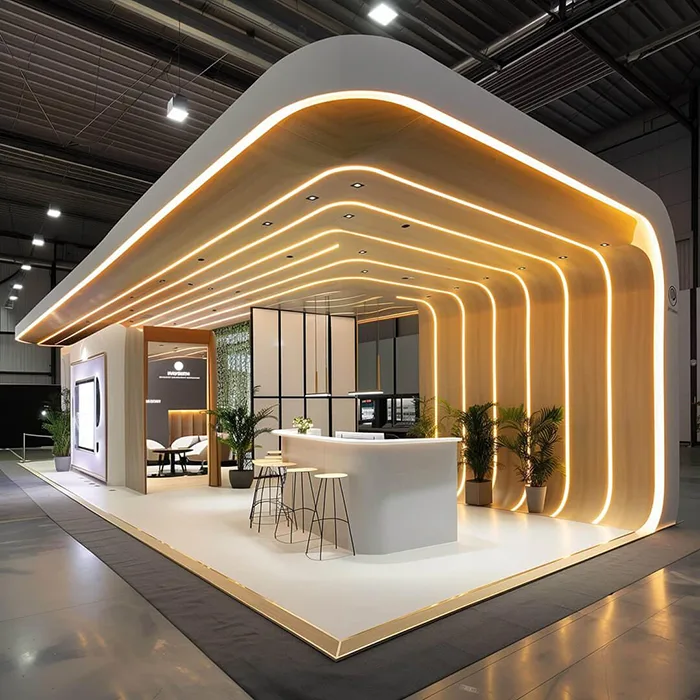
This is the reason some exhibitors choose a single partner for booth design, AV and onsite trade show production under one team: the person laying out the frame is the same person who knows what the wall will weigh. Custom frames, curved walls and branded structures are also where event set design services and AV planning overlap, so bring both to the table early. If you are still early in the process, our guide on how to plan a trade show shows where display and AV decisions fall against your other deadlines.
Lighting That Works With Your Screens
Good lighting makes a booth feel finished. Bad lighting makes a screen look cheap. The aim is balance: your display should be the brightest thing in its zone without being the only thing that is lit.
- Highlight products and features with focused fixtures so the screen does not carry the whole booth.
- Match screen brightness to the surrounding light, then retest after the hall lights come up.
- Keep fixtures out of the direct reflection path of glossy displays.
- Watch for washed-out graphics: pale colors and thin fonts are the first to disappear in bright light.
If you want to compare fixture types and rigging options, our overview of event lighting solutions is a useful next read.
Sound Without the Spill
Sound is where booths most often annoy their neighbors, and where exhibitors most often lose their own audience. A demo that cannot be heard is a demo that does not happen.
For options and equipment, see our guide to event sound system.
Product demos:
use directional speakers aimed at the visitor zone, not the aisle.
Presentations:
decide in advance whether you need a microphone, and which kind suits the speaker.
Use directional audio or a quiet demo area instead of increasing volume.
Show rules:
many shows set sound level limits, so check yours.
Video Content and Playback
The most expensive wall in the hall still looks poor if the video on it is poor. Treat content as part of the system, not an afterthought.
Resolution:
build to the wall's real pixel dimensions, not a standard size.
Format:
check which file types and codecs your player accepts, and export a test file early.
Scheduling:
if you run live demos and loops, plan how they switch.
Reliability: use a dedicated player for looping content rather than a personal laptop, which can sleep, update or crash.
Testing: play the full content on the actual wall, at the actual brightness, before the show opens.
If you need help producing the video itself, our event video services cover content as well as playback. Booths that stream to a remote audience may also want to look at hybrid event production, and fully online sessions are covered by our virtual event production services. The same playback discipline carries over to internal events too, including sales kickoff event production.
Trade Show Display and AV Integration Checklist
Use this list during planning and again during setup.
|
Area |
What to confirm |
|---|---|
|
Displays |
Type, size, pixel pitch, brightness, mounting method |
|
Signal and connections |
Source, player, processor, cable types and lengths, spare cables |
|
Power |
Circuits available, total draw, distribution, surge protection |
|
Lighting |
Fixture positions, glare check, brightness levels by time of day |
|
Audio |
Speaker aim, microphones, volume limits, show rules |
|
Cable routing |
Hidden runs, trip hazards, access points |
|
Content testing |
Full playback on the real wall, correct aspect ratio, safe zones |
|
Backups |
Spare player, backup content on a drive, spare cables, technician contact |
Prepare Your Trade Show AV Setup
Use our printable AV spec checklist to review displays, power, lighting, audio, cabling, and content testing before your next design review.
Common Display and AV Mistakes
1
Choosing screens without measuring viewing distance.
Pitch and size are guesses until you know where people stand.
2
Planning AV after fabrication.
Late changes cost time, labor and sometimes structural rework.
3
Ignoring power limits.
A wall that needs more than the booth supply will not run at full brightness, or at all.
4
Wrong content formats
Stretched video, tiny text and missing safe zones look careless.
5
Sound spill.
Loud demos annoy neighbors and invite complaints from show management.
6
No full-system test.
Individual parts can work perfectly and still fail together.
Real Booth and AV Examples
The projects below show how these decisions play out. Details will be confirmed and approved before publishing.
Island booth with a double-sided LED wall and hanging sign. An open layout where the wall is visible from several aisles.
Display Type: Double-Sided Modular LED Video Wall | Booth Configuration: Open Island Booth | Screen Dimensions: 10 ft × 8 ft per side (3.05 m × 2.44 m) | Pixel Pitch: P2.6 mm (Indoor LED) | Display Resolution: Approximately 1,152 × 960 pixels per side | Hanging Sign: Overhead Suspended Branded Signage | AV Integration: Video Processing, Content Playback and Signal Distribution | Event Type: Trade Show
LED wall build on ground-support frames and an aluminum frame. A freestanding structure built for stability and quick install.
Display Type: Modular LED Video Wall | Support Structure: Ground-Support Frames with Aluminum Framing | Screen Dimensions: 10 ft × 8 ft (3.05 m × 2.44 m) | Pixel Pitch: P2.6 mm (Indoor LED) | Display Resolution: Approximately 1,152 × 960 pixels | Panel Configuration: 6 × 5 LED Cabinets (500 mm × 500 mm) | Installation: Modular Assembly, Structural Alignment and Display Testing | Event Type: Trade Show
Curved LED wall on a conference stage. A curved canvas that wraps the presenter and fills the room.
Display Type: Curved Modular LED Video Wall | Stage Configuration: Curved LED Stage Backdrop | Screen Dimensions: 24 ft × 8 ft (7.32 m × 2.44 m) | Pixel Pitch: P2.6 mm (Indoor LED) | Display Resolution: Approximately 2,688 × 960 pixels | Curve Configuration: Custom Curved Display Structure | AV Integration: Video Processing, Presentation Playback and Branded Motion Graphics | Event Type: Corporate Conference
AV Questions to Ask Before You Order
Put these to any vendor, including us. The quality of the answers tells you a lot.
- Which pixel pitches are available, and which do you recommend for my viewing distances?
- What controller and signal path will you use?
- What redundancy is built in if a player or cable fails?
- Who tests the content on the actual wall, and when?
- Who is onsite during the show, and how quickly can they reach my booth?
- What are the power and weight requirements, in writing?
If you plan to capture booth sessions or talks, ask about recording options for live sessions at the same time, since camera and audio feeds are easier to plan in from the start.
FAQ About Trade Show Display and AV Integration
Ready to Plan Your Trade Show AV?
Let Eleven Eleven Audio Visual help you create a reliable, engaging booth experience. Share your event details, booth dimensions, and AV requirements with our team to start planning.